babystonefruit
Baby StoneFruit
A Pebble watch app for one-tap logging of diaper changes and feedings to Huckleberry, routed through your own Home Assistant.
Built on the modern Moddable Pebble JS SDK (Piu UI + Moddable XS). No custom backend — your Home Assistant is the backend.
Features
- Four one-tap actions: Diaper, Bottle, Nurse, End Nursing
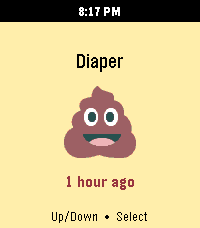
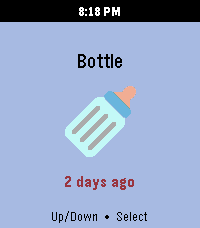
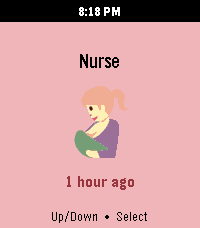
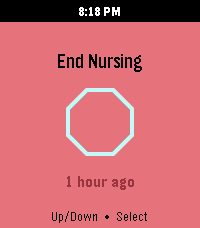
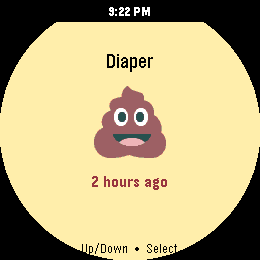
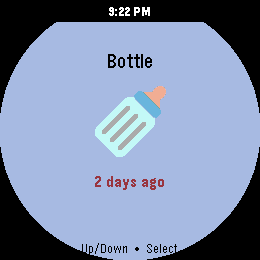
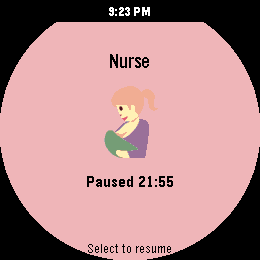
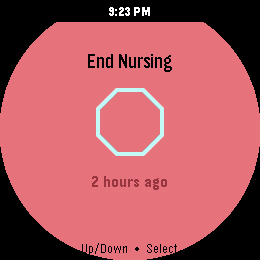
- Color-coded screens with emoji icons matching Huckleberry’s mobile-app palette
- Last-event time below each icon (e.g. 5 min ago) — turns red after 1 hour
- Live nursing timer that ticks while a session is active and freezes while paused
- Pause / resume the active nursing session directly from the watch (Select toggles)
- Configurable one-tap defaults — choose the diaper type (pee / poo / mixed / dry), amounts, color, and consistency, plus the bottle amount (1–6 oz) and type, from the in-app settings page
- Secrets stay encrypted in CloudPebble — no tokens in source, no extra server to run
Screenshots
Captured on a Pebble Time 2 (Emery, 200 × 228). The “X ago” line turns red once the last event is more than an hour old.
Rectangular (Pebble Time 2, Emery)
| Diaper | Bottle | Nurse | End Nursing |
|---|---|---|---|
 |
 |
 |
 |
Round (Pebble 2 Duo, Gabbro)
| Diaper | Bottle | Nurse | End Nursing |
|---|---|---|---|
 |
 |
 |
 |
Requirements
- A Pebble watch running Rebble’s modern firmware. Targets in
package.json:emery— Pebble Time 2gabbro— Pebble 2 Duo
- A Huckleberry account with a child set up
- A Home Assistant instance reachable from your phone (local network or Nabu Casa)
- The Huckleberry Home Assistant integration by Woyken — Woyken/huckleberry-homeassistant (install via HACS or manually under
custom_components/) - A CloudPebble account to build & install (this project syncs from GitHub)
Setup
1. Install and configure the Huckleberry HA integration
Follow the integration’s README. After signing in with your Huckleberry credentials, you should see one device per child and three sensors per device:
sensor.<child_name>_diaper(TIMESTAMP — last diaper change)sensor.<child_name>_bottle(TIMESTAMP — last bottle)sensor.<child_name>_nursing(ENUM:active/paused/none)
Quick sanity check from a terminal once you have a long-lived access token:
HA_URL='https://your-ha.example.com'
HA_TOKEN='eyJhbG...'
DEVICE_ID='your_child_device_id'

# Should return HTTP 200 + JSON
curl -s -o /dev/null -w "%{http_code}\n" \
  -H "Authorization: Bearer $HA_TOKEN" "$HA_URL/api/"

# Should log a diaper change in the Huckleberry mobile app
curl -X POST "$HA_URL/api/services/huckleberry/log_diaper_both" \
  -H "Authorization: Bearer $HA_TOKEN" \
  -H "Content-Type: application/json" \
  -d "{\"device_id\":\"$DEVICE_ID\",\"pee_amount\":\"medium\",\"poo_amount\":\"medium\",\"color\":\"yellow\",\"consistency\":\"runny\"}"
2. Create a long-lived access token
In Home Assistant: Profile → Security → Long-Lived Access Tokens → Create Token. Save it somewhere safe — you’ll paste it into CloudPebble’s encrypted env vars.
3. Find your child’s device ID
Settings → Devices & Services → Huckleberry → click your child → click the device ID value to copy. It’ll look like e754ec7bb8cdca212be0cd0897c83eaf.
4. Configure the app — either way works
The easy way (recommended for end users): install the built .pbw, then open the Pebble companion app on your phone → gear icon next to Baby StoneFruit. The in-app settings page asks for your HA URL, access token, device ID, and (optionally) the child’s name. Settings live only on your phone.
The build-time way (for developers building from source): open the project in CloudPebble, Settings → PebbleKit JS Environment Variables, and add:
| Variable name | Value |
|---|---|
Home_Assistant_URL |
your HA base URL, no trailing slash, e.g. https://home.example.com |
HA_long_token |
the long-lived access token from step 2 |
HA_kid_device_id |
the device ID from step 3 |
CloudPebble stores these encrypted at rest, but they are inlined into pkjs/index.js as string literals at build time and embedded in the compiled .pbw. That’s fine for private dev installs, but clear these env vars in CloudPebble before doing any publish-build, or the resulting .pbw will ship your credentials to anyone who downloads it from the Rebble app store. See docs/APP_STORE.md for details and a recovery checklist if you’ve already published with values set.
Any value set via the in-app settings page overrides the env var.
5. Build and install
In CloudPebble, Compile the project, then install on your watch (real device or emulator). The Diaper screen should appear within a second, with a X ago timestamp below the icon if your child has any recent diaper events in Huckleberry.
Usage
Single screen with four physical buttons:
| Button | Function |
|---|---|
| Up | Previous action |
| Down | Next action |
| Select | Log the current action (or pause/resume during an active nursing session) |
| Back | Exit the app |
Actions
| Action | Color | Icon | Maps to |
|---|---|---|---|
| Diaper | 🟡 yellow | 💩 | huckleberry.log_diaper_* — service and values follow the defaults set in Settings (out of the box: log_diaper_both, medium pee + poo, yellow, runny) |
| Bottle | 🟣 purple | 🍼 | huckleberry.log_bottle — amount and type follow the defaults set in Settings (out of the box: 4 oz formula) |
| Nurse | 🩷 pink | 🤱 | huckleberry.start_nursing |
| End Nursing | 🟥 red | 🛑 | huckleberry.complete_nursing |
Active-nursing flow
- Cycle to Nurse and press Select — starts a session in Huckleberry.
- The screen swaps the “X ago” line for a live
mm:sstimer; the hint becomes Select to pause. - Press Select to call
huckleberry.pause_nursing. The timer freezes at the current value; hint becomes Select to resume. - Press Select to resume; the timer continues from where it paused.
- When you’re done, cycle to End Nursing and press Select — calls
huckleberry.complete_nursingand logs the session.
The on-watch timer mirrors HA’s authoritative “current left + right duration” so it stays in sync with the Huckleberry mobile app even after pause/resume.
How it works
Pebble watch (src/embeddedjs/main.js — Moddable XS / Piu)
    │  AppMessage  { ACTION: … }
    ▼
Phone (src/pkjs/index.js)  ←  CloudPebble env vars inlined at build time
    │  HTTPS calls to:
    │    POST /api/services/huckleberry/<service>   ← log actions / pause / resume
    │    POST /api/template                          ← fetch last-event timestamps
    ▼
Home Assistant + Woyken/huckleberry-homeassistant
    │  huckleberry-api (Python) over Firebase
    ▼
Huckleberry / Firestore
- Watch ↔ phone uses Pebble AppMessage (
pebble/message) — small payloads, declared inpackage.json’smessageKeys. - Phone ↔ HA uses regular
XMLHttpRequest(the phone has real browser APIs; the watch does not). - Last-time discovery uses HA’s
device_entities()template function to find the configured child’s*_diaper,*_bottle,*_nursingsensors — no extra env vars needed, and stale*_last_*entities from older integration versions are skipped via a negative-lookbehind regex.
Why does this need Home Assistant?
Huckleberry’s backend is Google Cloud Firestore, which is accessed over gRPC (HTTP/2 with protobuf framing). There’s no public REST endpoint to call. Every working library out there — including the Python huckleberry-api this project ultimately relies on — goes through Firebase’s gRPC SDK.
The Pebble JS environment can’t speak gRPC, on either side of the bridge:
- The watch runs Moddable XS — a small embedded JS runtime. App size budget is tiny, the network stack is bridged through the phone, and the module system is custom (no
npm). gRPC-web and the Firebase JS SDK are both far too large and don’t fit anyway. - The phone companion (PebbleKit JS /
pkjs) is a sandboxed JS context with browser-ish APIs (XMLHttpRequest,fetch). It can do plain HTTPS to anything, but it can’t load the Firebase SDK either (size + bundling) and there’s no native gRPC stack.
So something else has to translate “HTTPS request the phone can make” into “gRPC call to Firestore”. Pretty much anything that runs Python works for this — an earlier prototype of this app used a tiny custom Flask proxy that wrapped huckleberry-api directly. Home Assistant happens to be a particularly good fit because:
- It runs Python, so
huckleberry-apiand the Firebase SDK Just Work. - It already exposes a clean HTTPS REST API that the Pebble companion can call.
- There’s already a maintained integration —
Woyken/huckleberry-homeassistant— that wrapshuckleberry-api, polls Firestore in the background, exposessensor.*_diaper/*_bottle/*_nursingentities, and registers services likehuckleberry.log_diaper_bothandhuckleberry.pause_nursing. The watch just calls those services over HTTPS.
The chain watch → phone → Home Assistant → Huckleberry looks indirect on the diagram, but every hop does something the next one can’t.
Alternatives if you don’t already run Home Assistant
Any small Python service exposing HTTPS works as a drop-in replacement for HA in the chain. The earliest prototype here was a Flask app that hosted huckleberry-api directly and exposed routes like POST /diaper. If that’s appealing — you don’t want a full HA install just for this — the source history of PR #11 and earlier has the Flask prototype. Updating pkjs/index.js to point at your proxy’s URLs instead of HA service paths is a small change.
If I have something wrong here, please open an issue. I’d love to know if there’s a way to talk to Huckleberry directly from Pebble JS — that would simplify everything.
Repository layout
.
├── package.json                # Pebble project + CloudPebble env-var refs + resources
├── config/
│   └── config.html             # Pebble in-app settings page (served via GitHub Pages)
├── tools/                      # svg2pdc converter + Twemoji SVG sources
└── src/
    ├── embeddedjs/             # Runs on the watch (Moddable XS)
    │   ├── main.js             # UI, button input, AppMessage to pkjs, time ticker
    │   ├── manifest.json
    │   ├── poop.pdc            # Twemoji icons as PDC vectors —
    │   ├── bottle.pdc          #   loaded by Moddable resources system
    │   ├── nursing.pdc         #   and rendered via Piu's SVGImage element
    │   └── stop.pdc
    ├── pkjs/
    │   └── index.js            # Runs on the phone — HA fetch + state fetch + settings
    └── c/
        └── mdbl.c              # Moddable boilerplate (untouched)
The settings page is hosted via GitHub Pages at https://babystonefruit.michaellunzer.com/config/config.html. When the user opens the gear icon in the Pebble companion app, showConfiguration in pkjs/index.js opens that URL with the current settings encoded in the query string. The page redirects back with the new settings via the pebblejs://close#… scheme; pkjs persists them in localStorage.
Limitations & known gaps
- Bottle has no “session” concept. Huckleberry models a bottle feeding as a one-shot event with an amount. The watch logs the bottle instantly when you press Select — the amount and bottle type are configurable in the app’s Settings page (defaults: 4 oz of formula). There’s no live bottle timer because there’s no server-side equivalent of
pause_nursing. - Single-child only for now. The integration supports multiple children; the watch app currently uses one configured
HA_kid_device_id. An in-app child picker is a reasonable future addition. - Pebble app size is small. All four emojis are bundled as PDC (Pebble Draw Command) vectors — each ~200–600 bytes on disk and ~250 bytes RAM, vs ~20 KB RAM per decoded 72×72 RGBA bitmap. Frees enough memory headroom on the device to actually add features.
- Polling cadence. The watch refreshes state on startup and after each successful log. Externally-triggered changes (e.g. logging from the Huckleberry mobile app) won’t show up until the next watch action.
Changelog
See CHANGELOG.md. Current version: 1.0.4.
Credits
- Huckleberry — the baby tracking app this hooks into.
- Woyken/huckleberry-homeassistant — the unofficial HA integration that bridges Huckleberry’s Firestore to HA entities and services. None of this would exist without it.
- Moddable — the JS runtime used by the modern Pebble SDK.
- Rebble — keeping Pebble alive years after the original company shut down.
- CloudPebble — the web IDE used to build and install this.
- Twemoji (MIT) — source SVGs for the emoji icons, converted to PDC for runtime efficiency. Sources kept in
tools/. - svg2pdc.py — Pebble Examples’ SVG-to-PDC converter (ported to Python 3).
- Home Assistant — the glue layer that makes calling Huckleberry from a watch a sane thing to do at all.
Built with Claude
Heads up — this was vibe coded. I built the whole thing in a long back-and-forth using Claude Code. I’d describe what I wanted, run whatever it spat out on the watch, tell it what broke, and we’d go again. Pretty fun, and we got surprisingly far. Every change ended up tested on a real Pebble against a real Huckleberry account before it was published to the Pebble App Store.